Essential Maintenance for Your Website: A guide to save and repeat each year
Speaking to my small businesses and design pals, the new year either brings a moment of stillness and reflection OR a huge swam of new work as clients and customers prepare for spring. I’ve been lucky enough to be at both sides, but this year I’ve got a bit of a gap so I’m taking a moment to figure out what this year looks like for me and work on helping more people. One of my goals for this coming year is to get back to blogging. I’ve been finding Instagram so creatively draining and repetitive in recent months, and I really want to find a way to authentically connect to more designers and small businesses online without getting sucked into the noise and sales-chat of Instagram.
With all that in mind, if you are like me and are taking a bit of a slower start to 2026 or find yourself watching the snow outside while you wait for your first bookings - you can get a head start on your website maintenance and go forth into spring knowing that your website is still working for you and looking its best.
This blog post focuses on the core areas of messaging, communicating your value, design, SEO and ensuring your site works to bring you clients. I wrote this blog post with Squarespace in mind, as it’s the platform I use and create for my own clients - but you can take these principles into Wordpress, Shopify, Wix and other providers.
Your website's written content and messagingCheck your content: You’ve probably gotten used to describing your services in a few keywords - such as colourful, playful, professional or collaborative - so check your content to ensure the words you are using still feel right to you. I also find that by rereading my content over, I get new ideas for my social media and feel clearer about what language I should use to promote my work, and that keeps my messaging consistent.
Review your services and make sure they still align with what you want 2026 to look like for you: This is a great time to think more about what worked well for you last year and what you want to invite more of in 2026. For example, I really loved working on brand stickers and larger 20-page brand guidelines as part of my branding process in 2025 - so I’m thinking about how I can add more of that into my service descriptions to ensure my viewers know the value that it adds and how it sets me apart from other designers.
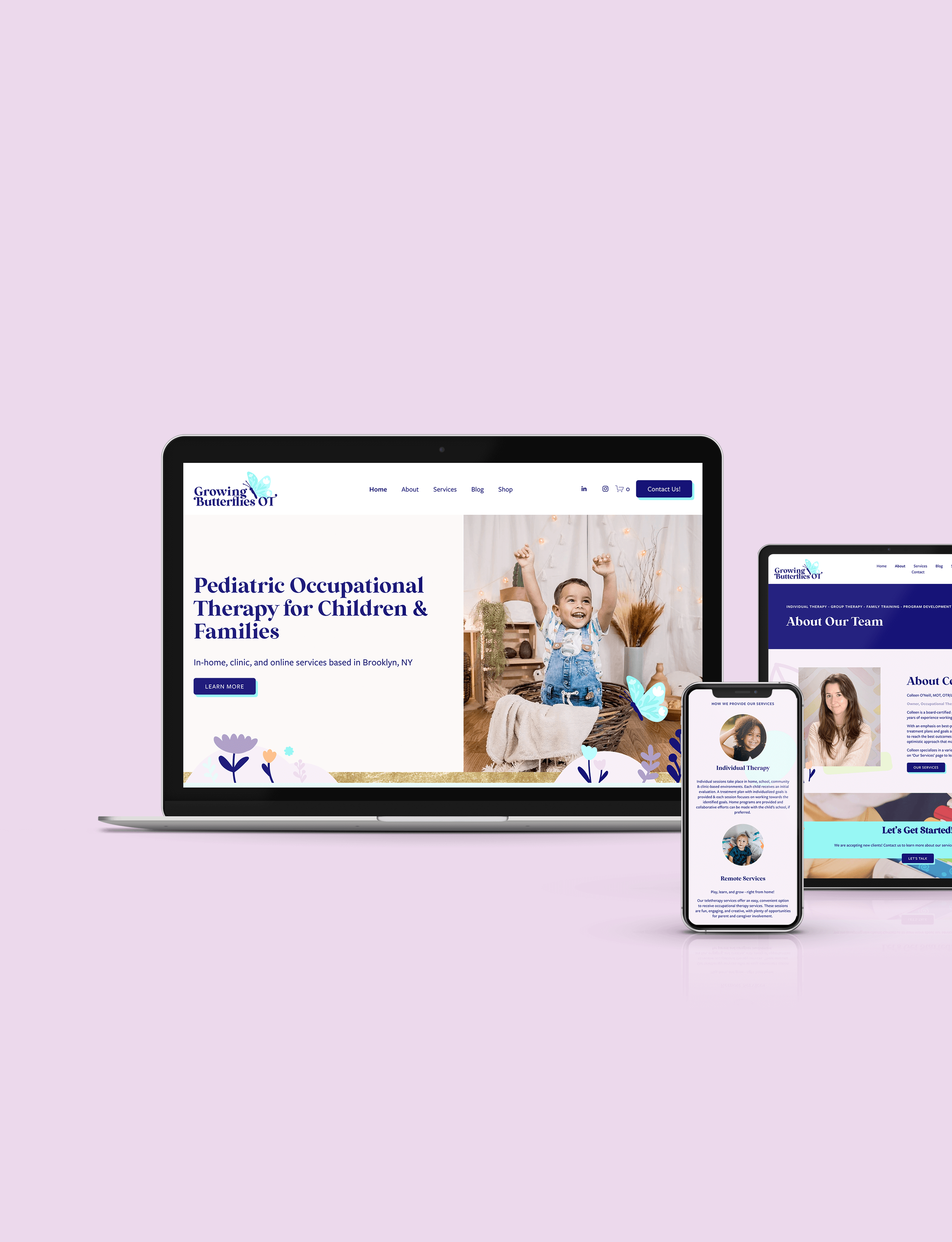
Colleen’s strong written content, paired with my design makes for an engaging customer journey with a clear path to contacting her. See more here!
Your success stories: sell yourself with new portfolio pieces and update recent testimonialsUpdate your portfolio: Creating portfolio imagery can often be put to the bottom of our to-do lists as paying client work comes in, but I promise you that it is so important to get into a good flow and create strong portfolio summaries that promote you. Bonus points if your portfolio pages SHOW what it was like to work with you and give the viewer a full sense of the process from start to finish - I’m talking colour palettes and mood boards, that lead to a logo set, that lead to icons, website mockup and perhaps social media examples. A testimonial from the client. Then a few summarising images that show all the work together as one. I like to think of my portfolio pages as telling a story with images and I promise every one of your projects, even the smallest ones, has a complete story to tell.
Update testimonials: Testimonials never really expire - but as you promote a project less and less as the years go by, the testimonial becomes a little weaker. Make sure that your testimonials are from the projects that you feature on your homepage and service pages so that viewers can read about the work they are seeing.
Your SEO: keeping google happyCheck your SEO meta descriptions and titles: When you click the three little dots of a page in Squarespace, you can go to SEO tab to read over the title and description of your website page. It’s not necessary to change these every year, but make sure they are there on every page and blog post, and they summarise your page in a really clear statement, that is readable as a sentence, and includes a few keywords and your service location.
Ensure all images have visual descriptions: It might seem like an extra step but adding a visual description when you upload imagery is so so so important for those who are blind or have a visual impairment. It’s good from an SEO perspective, but try to think of it more as helping make your site accessible for every person, and ensure your descriptions are accurate, give a detailed description of the image and aren’t just jam-packed with unreadable keyword spam.
Check all your buttons and links go to the right place: You may delete pages, adjust your services or add new forms throughout the year - so taking a bit of time to click on every link and give this a bit of TLC is well worth it. If viewers get to a broken link, they are very likely to close your site and that connection moment that you’ve worked so hard for is lost.

Project pages that go over every detail and deliverables are really powerful at creating the full story of the project. This example is from my portfolio here with the UK based MeaningfulMarketing agency.
Your Design: how your website looksRefresh imagery: I still have a profile picture on my website from 2019 - so I’m not here to judge. Just to give you a gentle nudge to update images of yourself if the opportunity arises. Images of you working or designing get bonus points, as they give viewers an insight into you and your process.
Check font sizes across the site are still working for you: This step is especially important if you run a blog. Have a look at your pages and a few blog posts and ensure your fonts feel like a good, readable size with good hierarchy between the titles and paragraphs. The titles should feel large and take centre stage and the paragraphs are smaller companion pieces.
Your Process: how clients reach out and connect with youCheck your enquiry form still goes to the right place and the process of getting in touch with you is clear: There should be roughly three steps between the viewer and you - this is usually a snappy homepage or overview > into a more detailed service page > then to a contact form. If you have additional steps or pages then consider stripping back the process to make it clear and direct. The more steps a viewer has to go through, the higher the chance is of them clicking away or becoming distracted and you may loose the connection moment.
Check all your buttons and links go to the right place: I’m repeating this as this is so so so important. Broken links break the connection between yourself and a viewer and they are likely to click away. Don’t lose that connection opportunity!
Legal: fulfill your obligations to your clientsReview your terms and ensure you are sticking to them: Most Terms and Cookies pages are very simple to follow - such as ensuring you don’t sell your viewer’s data and ensure you are respectful and protective of their personal information. But some have extra tasks such as deleting customer’s data after a set number of years or removing them from email lists. Check what your terms are and give yourself a nudge to follow your legal obligations fully.
Update your copyright year in your footer: Most footers will have your business starting year and the current year with a little copyright symbol ©️ - such as ‘Begin Studio 2020-2026 ©️’. It’s a little step that shows that you are active in your business and will protect your copyright. At the start of every year, I’ll go through and update my client’s footers.
And there you have it. Repeat this once (or even twice) a year and you’ll always be sure your website is working, tells your story, shares your successes, keeps viewers connected and ensures clients find their way to you.
And if you are new around here, then my name is Amy and I love to share the behind the scenes of my design business to help those who are starting out or unsure what to do - because I certainly didn’t learn about any of this in design school.
If you have any additions or have any questions as you work through these, I’d love to email with you and keep in touch. You can reach me directly at amy@beginstudio.co.uk
Amy x

Hey! I’m Amy, and this is Begin Studio.
Here I create unique, thoughtful brands for small businesses in the UK and beyond. I guide my clients from logo and branding design all the way through to packaging, websites and even the social media launch of their new business. I also run a small blog with resources for designers who are just starting out in the freelance world or are recent graduates.

For offers and resources directly into your inbox. ✨